

Improving BI Delivery Timelines with Power BI Modelling MCP Server
Business Intelligence projects rarely slow down because dashboards are difficult to build. They slow down because everything around the dashboard takes time understanding messy data, designing semantic models, documenting logic, and then explaining all of it to someone else.
The first few days go into exploring tables, figuring out relationships, renaming columns, writing measures, and documenting assumptions. By the time reports are ready, documentation is often incomplete or already outdated. When change requests arrive, the same cycle starts again.
This is where the Power BI Modelling MCP Server starts to make sense not as a flashy AI feature, but as a practical tool that reduces friction in day-to-day BI work.
Where Time Is Really Lost in BI Projects
Understanding a new dataset takes time. Designing a clean semantic model takes time. Writing documentation that someone else can understand takes even more time. None of this work is particularly creative it is repetitive, careful, and prone to error.
Traditionally:
- Data Silos: Production data (MES), machine health (IoT), and inventory/cost data (ERP) reside in separate, often incompatible, systems.
- Inconsistent Data Quality: The complexity of integrating these disparate sources manually leads to data discrepancies and inconsistencies
- Real-Time Limitations: High-velocity IoT data overwhelmed traditional storage and refresh cycles.
- Licensing Rigidity: The static, high cost of Power BI Premium (P-SKUs), which lacked flexibility and locked users into a BI-only toolset.
Over time, this leads to inconsistent models, longer onboarding, and slower delivery across projects.
What Is Power BI Modelling MCP Server?
Power BI Modelling MCP Server is a model-aware assistant designed to work directly with Power BI semantic models. Unlike generic automation tools, it understands the structure and intent of a Power BI model tables, columns, relationships, hierarchies, and business logic.
It operates on semantic models using formats such as TMDL (Text-based Model Definition Language) and JSON, which allows it to analyse, modify, document, and even translate models in a controlled and transparent way.
Importantly, MCP Server does not act blindly. It works through explicit commands (often via Visual Studio Code) and asks for confirmation before performing any change. This makes it suitable for real BI environments where governance and control matter.
What MCP Server Actually Helps With
After testing MCP Server hands-on, one thing becomes clear: it doesn’t try to replace analysts it removes the repetitive and time-consuming parts of their work.
The server can read existing semantic models, understand relationships and hierarchies, and explain them back in a structured way. This alone saves hours that would otherwise go into reverse-engineering models built by someone else.
1. Semantic Modelling, Done Consistently
MCP Server accelerates semantic modelling by suggesting well-structured schemas, defining relationships with correct cardinality, and explaining why the model is designed a certain way. The real benefit here is consistency. Across projects, modelling patterns remain predictable, which is especially valuable in teams sharing a common data foundation.

2. Business Logic and DAX Support
MCP Server can understand data patterns and assist in creating DAX measures that are context-aware and aligned with the semantic model. It also helps validate and troubleshoot existing DAX, reducing back-and-forth during testing and review cycles. Bulk changes such as renaming columns or standardizing logic are handled safely, always with explicit user permission.
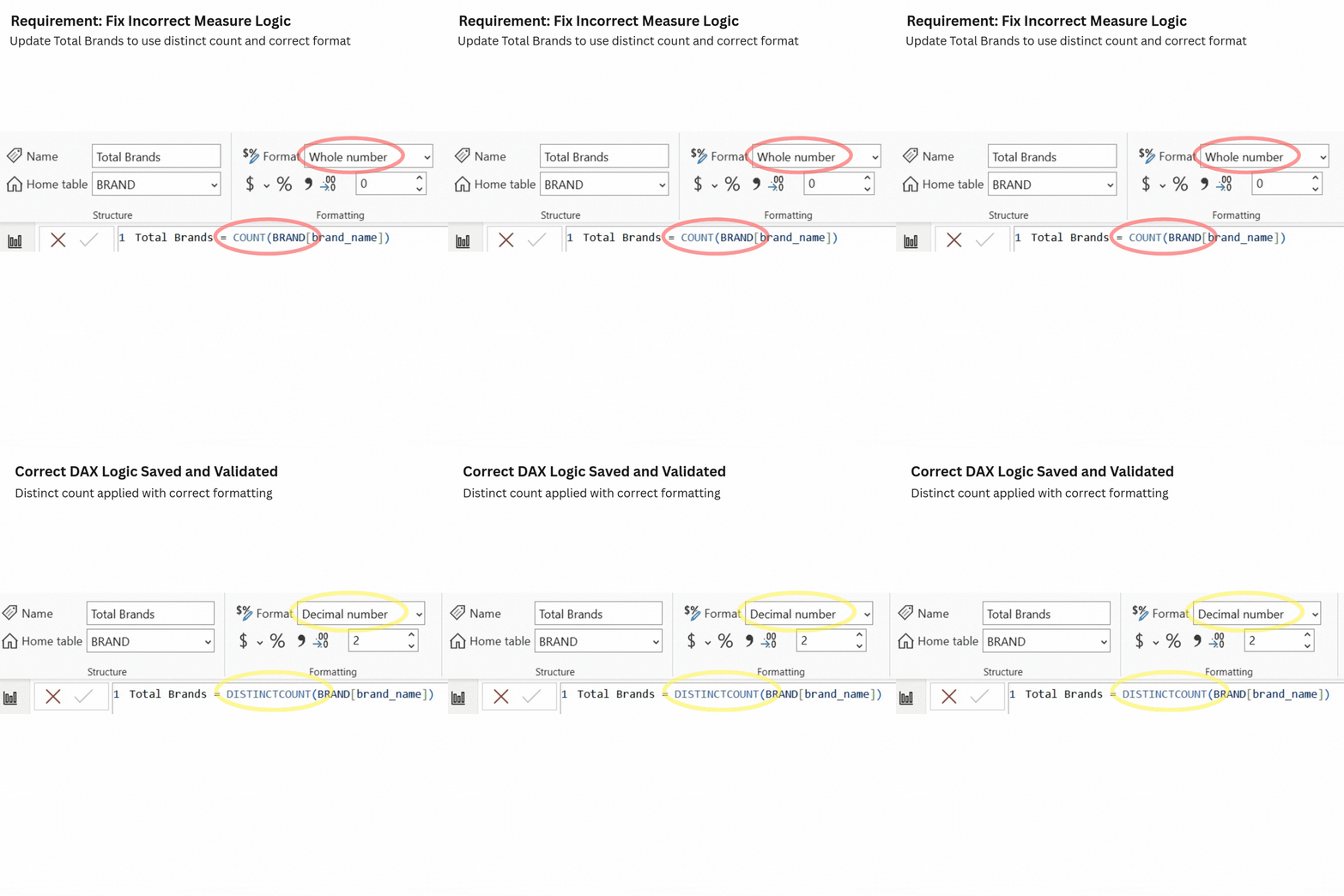
3. Working with TMDL, JSON, and Version-Controlled Models
One of the more advanced but very practical capabilities is exporting semantic models as TMDL and JSON files. This allows models to be version-controlled, shared, and reused across Power BI Desktop and Service environments.
Along with the exports, MCP Server provides clear guidance on how to import and manage these models, which reduces friction for teams trying to move toward more disciplined BI development practices.
4. Power Query Transformations Using Natural Language
Beyond modelling, MCP Server also helps with Power Query transformations. Analysts can describe required transformations filtering rows, renaming columns, merging tables, or changing data types in natural language. MCP Server translates this intent into Power Query changes, asks for confirmation, and can either apply the changes or simply share the updated logic. Along with this, the MCP Server also documents the changes and the purpose behind the changes.
This makes data preparation faster and easier to understand, even for analysts who prefer not to work deeply with M code.
5. Documentation as a First-Class Output
Documentation is where MCP Server delivers some of its strongest value. When guided with templates, it can generate data dictionaries, model explanations, transformation details, and relationship documentation often with diagrams and structured tables. Outputs can be shared as Word documents, PDFs, or text files.
Instead of being a rushed, last-minute task, documentation becomes a repeatable and low-effort part of the BI process.
Where MCP Server Falls Short
MCP Server is not designed to do everything. It does not create brand-new Power BI files from scratch, and it is not meant for dashboard mock-ups or report generation. While it excels at technical documentation, explaining concepts to non-technical audiences may still require guidance through templates.
These limitations are not weaknesses they define where MCP Server fits best: semantic modelling, transformations, and documentation, not visualization design.
Security and Governance Considerations
MCP Server is not designed to do everything. It does not create brand-new Power BI files from scratch, and it is not meant for dashboard mock-ups or report generation. While it excels at technical documentation, explaining concepts to non-technical audiences may still require guidance through templates.
These limitations are not weaknesses they define where MCP Server fits best: semantic modelling, transformations, and documentation, not visualization design.
Where MCP Server Falls Short
Before using MCP Server in any environment especially production it is essential to review Microsoft’s official security and privacy documentation.
MCP Server interacts deeply with semantic models and metadata. Teams must clearly
understand:
- What data is accessed
- How model definitions are handled
- Where processing occurs
- How permissions are managed
Productivity gains should never come at the cost of security or compliance.
The Real Impact on BI Teams
The biggest value of MCP Server is not speed alone it is where the time is saved.
In a typical BI project, analysts spend a large portion of their time on semantic modelling, DAX rework, column standardization, and documentation. With MCP Server assisting in these areas, much of this manual effort is reduced. In practice, semantic model design effort can drop by 30–40%, DAX development and validation by 25–35%, and documentation effort by 50–70%, as logic and documentation are generated alongside the model instead of being created separately. This changes how BI teams work analysts spend less time explaining and fixing models, and more time analysing data and responding to business needs. Change requests also become easier to handle, since models are structured, documented, and safer to modify.
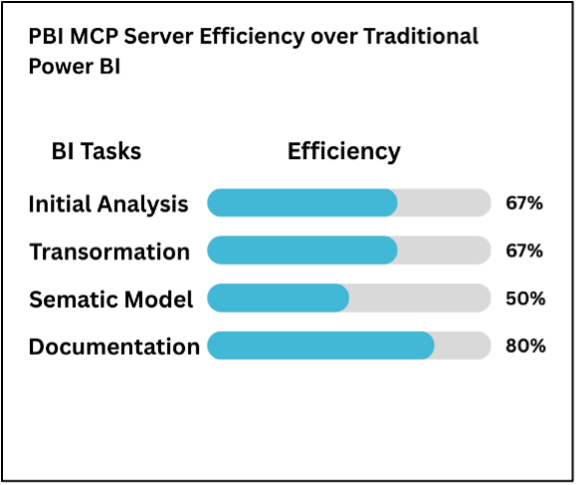
Note: Efficiency figures shown in above chart are approximate and based on internal proof-of-concept evaluations.
A Practical Approach to Adopting Power BI MCP Server
Organizations should approach Power BI Modelling MCP Server as an incremental adoption, not a big-bang change. A good starting point is to use it for low-risk tasks such as model understanding, documentation, or small DAX updates, and gradually expand usage as teams gain confidence. Adoption works best when teams define clear usage guidelines, review security considerations early, and treat MCP Server as a support tool that enhances existing BI practices rather than replacing them.
Basic setup steps include:
- Ensure the user or team has GitHub Copilot access (free or paid, enabled in GitHub)
- Clone the Power BI Modelling MCP Server repository
- Configure the MCP Server using Visual Studio Code
- Connect it to the Power BI file or semantic model
- Validate permissions and test with simple commands before broader use for detailed and guided setup information please visit https://github.com/microsoft/powerbi-modeling-mcp
Choosing the Right Plan
MCP Server usage depends on GitHub Copilot plans, as it runs on the Copilot ecosystem.
- Copilot Pro suits individual analysts or small teams for regular modelling, DAX, Power Query, and documentation work.
- Copilot Pro+ or Business fits teams with heavier, frequent MCP Server usage and parallel work.
- Copilot Business or Enterprise is best for organizations with governance, access control, and compliance needs.
The key is to start small, validate real usage, and scale only when adoption justifies it.
Conclusion
Power BI Modelling MCP Server is not a magic solution. It is a disciplined tool that fits naturally into how experienced analysts already work.
One important point to remember is that output quality depends heavily on prompt quality. MCP Server responds to natural language, but clear instructions what you want changed, why, and how directly impact the results.
Used thoughtfully, MCP Server removes friction from Business Analysis projects, improves consistency, and saves time where it matters. For teams that care about clean semantic models, reliable documentation, and predictable delivery, it is a meaningful step forward.
.webp)